Making Claude’s research cache an on-demand skill

On this page7 sections ▾
I built a knowledge cache to make Claude research the technologies in a task before writing code. The output seemed more current, but loading the cache on every task added enough friction that I removed the global trigger within a week. I kept the repository and research skills, and now invoke them when I need them.
The idea came from several tasks where asking Claude to research the current documentation had helped me get unstuck: framework behaviour, a changed migration path, or a library API that had moved on. My prompt was usually some version of before you do anything, deeply research this technology. Current version, current best practices, breaking changes.
I wanted that research to happen without having to remember to ask. The useful part of the experiment was finding which work was worth making automatic.
#What I built
Three layers, all small:
- Trigger: a one-line
@~/.claude/knowledge-cache-instructions.mdimport in my globalCLAUDE.md. It told the agent to identify every technology in a task and check the cache first. - Orchestrator: a
tech-researchskill that read anindex.json, and on a cache miss spawned an isolated subagent to do deep research via context7,WebSearch, andWebFetch. Two outputs came back. A tight summary that entered the main agent's context, and a much longer full-research file that stayed on disk. - Storage: a public git repo, gordonbeeming/learning-agent, that auto-committed and pushed every new piece of research. The repo also let me sync the research across machines.
I added a second skill, tech-preferences, for things like "always use TanStack libs for React" or "for .NET projects, prefer minimal APIs". Worth flagging that Claude Code's auto-memory feature now does most of this on its own. The difference is scope: auto-memories are project-local by default, mine were global from day one.
The trigger file contained these instructions:
# Technology Knowledge Cache

Before working on any task involving a specific technology, framework, or library:

1. Identify ALL technologies/frameworks/libraries the task involves
2. Read ~/Developer/github/gordonbeeming/learning-agent/index.json ONCE
3. For each technology with a fresh entry, read its summary.md
4. For ALL technologies missing or stale, invoke the tech-research skill
5. Also read preferences/index.json and load matching preference files
6. NEVER skip this step — cached research dramatically improves code quality
7. Quality matters: ensure ALL relevant technologies are researched
Every session loaded these instructions before deciding whether they applied to the task.
#The good part
I saw fewer suggestions using outdated APIs. Within a week, the cache contained research used in projects involving React 19, Tailwind v4, Microsoft Teams Apps, Dynamics 365, Angular v21 and Auth0. The learning-agent repo's git history records those additions.
The research also challenged patterns I'd been using for years. That was useful beyond catching removed APIs, and it was why I wanted to keep the cache available.
#The friction
During the same week, I ran into three problems with the automatic workflow.
#Technologies chosen by the agent: "use a modern CSS framework"
I was building a small games app and asked Claude to make it look nicer with "a modern CSS framework". Claude picked Tailwind and went straight to npm install tailwindcss. It skipped both the cache check and the research skill.
The instructions only told the agent to research technologies the user mentioned. They didn't cover technologies Claude chose itself. I had to add a "Critical rule" paragraph saying that picking a library counts as introducing a technology, so the sequence is always identify → research → implement.
Covering that case required another instruction.
#Saving preferences: "I prefer doing web apps as React latest"
Mid-session, I told Claude my preference. It used React for that task. It did not save the preference.
The instructions told the agent how to load preferences, but never how to detect and save them. Another clause added: "When the user says 'I prefer / always use / I like to use', invoke the tech-preferences skill."
Loading preferences and recognising new ones needed separate instructions.
#Loading instructions on unrelated tasks
Every session loaded the instructions, including prose, refactoring and git tasks. The file said "does not apply to refactoring/git/prose", but the agent still had to read it, parse it, decide it didn't apply, then continue.
And when it did apply, it had to read the index, the per-tech summary, the preference index, and any matching preference files. That is a noticeable warm-up before any work happens. Sessions slowed down a lot. Output was better, but the feel of the tool changed.
#Research through the installed MCP tools
After I disabled the auto-trigger, I noticed Claude was still doing research before acting on Azure SQL work in fresh sessions. It was calling microsoft_docs_search and microsoft_docs_fetch on its own, before writing any code.
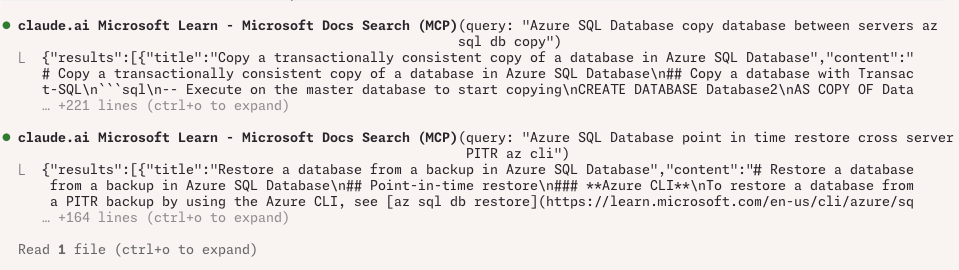
That's the Microsoft Learn MCP server. It ships with its own usage instructions, and the workflow it gives Claude is literally: "Use microsoft_docs_search first to find relevant documents... ideal for grounding answers in Microsoft knowledge." The context7 MCP server has the same shape: "Use even when you think you know the answer. Your training data may not reflect recent changes."
In those sessions, the installed tools already supplied instructions about when to research. My global workflow duplicated some of that guidance while requiring the agent to check the cache even on tasks that didn't benefit from it.
That observation was specific to the tools and sessions I tested. It supported keeping the global trigger disabled while leaving research available as an explicit action.
#Keeping the workflow small
Boris Cherny, creator of Claude Code, discussed a related approach on Lenny's Podcast in February. At 00:51:06, he described giving the model tools with minimal surrounding workflow:
The modern framing that I've been seeing in the last 6 months is a little bit different and it's: look at what the model is trying to do and make that a little bit easier. And so when we first started building Claude Code, I think a lot of the way that people approached designing things with LLMs is they kind of put the model in a box... for Claude Code we inverted that. We said the product is the model. We want to expose it, we want to put the minimal scaffolding around it, give it the minimal set of tools so it can do the things... it can decide which tools to run, it can decide in what order to run them in.
A bit later, at 01:04:18, he calls it "Ask not what the model can do for you". Don't try to over-curate or pre-contextualise the model. Give it the tools it needs and let it find its own context.
At 01:05:50, he recommends building for where models are heading rather than adding too much infrastructure around their current limitations. He also references Rich Sutton's "Bitter Lesson" at 01:04:43, in support of general methods over hand-coded rules.
That helped me put the experiment in context: some of my instructions were compensating for behaviour that the installed tools already addressed.
#What I'd do differently, and what I kept
I removed the automatic lookup and kept the parts I could call when needed.
I could have made this a user-invoked skill from the start. No auto-trigger, just /research React 19 when I actually want it. That's how Brady Stroud implemented his version, and that fits my use better: run the research when the task needs it.
So I deleted the @~/.claude/knowledge-cache-instructions.md import, kept the tech-research and tech-preferences skills as user-invokable, and kept the repo. The cached research is still useful when I pull it on demand. I just don't pay for the lookup on every prompt anymore.
The skills I've continued using include a custom statusline, GitButler integration, brand assets and tools for specific tasks. For research guidance, I now prefer instructions supplied alongside the relevant tool, plus an explicit research skill when I need a deeper pass.
#Try it
The repo is at github.com/GordonBeeming/learning-agent. The install script and skills still work. Install them as user-invokable rather than adding the global @path import, and the research runs when you request it.