The Mysterious Case of the Failing Azure SQL Deployment

On this page6 sections ▾
It's the message every developer dreads: “The deployment is failing.”
You check the logs. A workflow that's been running fine for months has suddenly broken. Nothing changed on main. No configuration was touched, as far as you can tell. And yet.
This is what happened when I hit one of those situations -- where the error message points you in completely the wrong direction.
#The Scene of the Crime
The setup had been running without issues:
- A GitHub Actions workflow for CI/CD.
- Passwordless deployments to Azure using OpenID Connect (OIDC).
- A PowerShell script to run permission scripts on Azure SQL using
Invoke-Sqlcmd.
Then one afternoon, everything went red.
#The Misleading First Clue
The first thing you see in the logs is this terrifying error message:
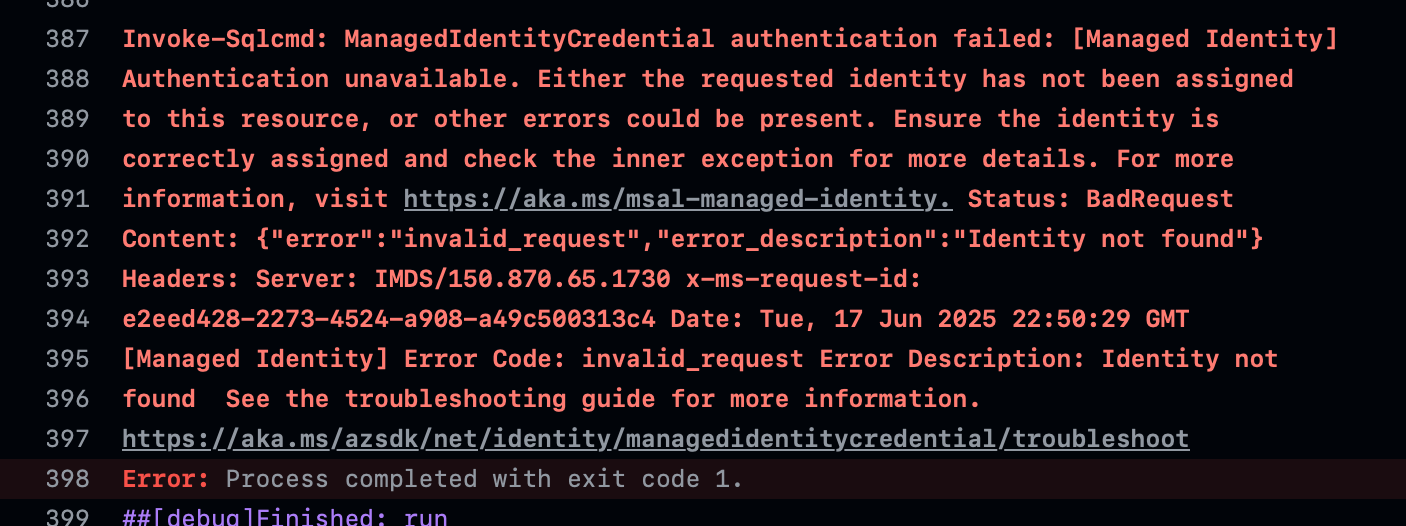
Your first instinct is Azure AD. Did someone delete the Service Principal? Was the Federated Credential on the App Registration removed? Did a new Conditional Access policy just land without warning?
The checklist:
- App Registration exists.
- Federated Credential looks fine.
- Permissions haven't changed.
- Entra admin confirms no new policies were applied.
Everything checks out. Which means the error message is lying to you.
#The Breakthrough
The turning point was a pretty simple observation: the step before the failing PowerShell script was working fine. A Bicep deployment in the same job, using the same identity, was successfully deploying infrastructure to Azure.
This meant the failure was isolated to the PowerShell step. The GitHub Actions log looked conceptually like this:
##[group]Run Bicep Deployment
Run azure/arm-deploy@v1
...
Deployment Succeeded.
##[endgroup]
✅  Success - Bicep Deployment (2m 15s)

##[group]Run Permission Scripts
Run ./scripts/apply-permissions.ps1
...
Invoke-Sqlcmd: ManagedIdentityCredential authentication failed...
##[endgroup]
❌  Failure - Permission Scripts (0m 12s)
Two things became clear:
- The authentication from GitHub to Azure was working.
- The Service Principal was valid and could get a token for the Azure Resource Manager (ARM) API.
The problem wasn't the identity. It was something specific to how the PowerShell script was connecting to Azure SQL.
#The Real Culprit
After digging into it, I confirmed that the Service Principal could get a token for Azure SQL -- running Get-AzAccessToken directly worked fine. The issue was that Invoke-Sqlcmd, when using Authentication=Active Directory Default, was failing to find and use that token on its own.
Something in the SQL driver on the GitHub runner couldn't complete the passwordless authentication handshake. Whether it's a bug or an incompatibility, I'm not sure -- but the behavior was consistent and reproducible.
#The Solution
The fix is to stop relying on Invoke-Sqlcmd's internal authentication and handle it yourself. Get the token with Get-AzAccessToken and pass it directly to Invoke-Sqlcmd.
Below is the PowerShell class I landed on. It also caches the token so multiple calls within the same script don't each hit the token endpoint.
using module ./Logger.psm1 # Custom logging module

class SqlFunctions {

    $logger = [Logger]::new()

    [string] $serverName
    $sqlAccessToken # This will cache our token object

    SqlFunctions(
        [string]$serverName
            ){
        Set-PSRepository -Name PSGallery -InstallationPolicy Trusted
        Install-Module -Name SqlServer -AllowClobber -Scope CurrentUser -Confirm:$false
        Install-Module -Name Az.Accounts -Repository PSGallery -Scope CurrentUser -Force -AllowClobber
        $this.serverName = $serverName
    }

    [void] AddUserToRole(
                [string]$groupOrUserName,
                [string]$databaseName,
                [string]$roleName) {
        $this.logger.LogActivity("🔐 Adding $($groupOrUserName) to $($roleName) for $($databaseName)...")
        $sqlCommand="IF NOT EXISTS (SELECT * FROM sys.database_principals WHERE name = '$groupOrUserName')
        BEGIN
            CREATE USER [$groupOrUserName] FROM EXTERNAL PROVIDER;
        END

        ALTER ROLE [$roleName] ADD MEMBER [$groupOrUserName];"

        try {
            # 1. Get the token (from cache or new)
            $accessToken = $this.GetSqlAccessToken()

            # 2. Pass it directly to the command and force errors to be caught
            Invoke-Sqlcmd -ServerInstance "$($this.serverName).database.windows.net" `
                    -Database $databaseName `
                    -Query $sqlCommand `
                    -AccessToken $accessToken.Token `
                    -ErrorAction Stop # Crucial for proper error handling!

            $this.logger.LogSuccess()
        }
        catch {
            $this.logger.LogError("Invoke-Sqlcmd failed. See the full error below.")
            Write-Error ($_.Exception | Format-List -Force | Out-String)
            exit 1
        }
    }

    [object] GetSqlAccessToken() {
        # 3. Check if we have a valid, non-expired token in our cache
        if ($this.sqlAccessToken -and (Get-Date).ToUniversalTime() -lt $this.sqlAccessToken.ExpiresOn.UtcDateTime.AddMinutes(-5)) {
            Write-Host "✅ Using cached and valid Azure SQL token."
            return $this.sqlAccessToken
        }

        Write-Host "Attempting to retrieve Azure SQL access token..."
        $sqlResource = "https://database.windows.net/"
        try {
            $this.sqlAccessToken = Get-AzAccessToken -ResourceUrl $sqlResource
            Write-Host "✅ Successfully retrieved Azure SQL token."
            return $this.sqlAccessToken
        }
        catch {
            Write-Host "❌ FAILED: Could not get the Azure SQL token. Halting."
            Write-Error ($_.Exception | Format-List -Force | Out-String)
            exit 1
        }
    }
}
Three things in this code are doing the actual work:
- Get the token yourself with
Get-AzAccessToken -ResourceUrl "https://database.windows.net/"-- don't letInvoke-Sqlcmdtry to figure it out. - Pass the token string directly via
-AccessToken $token.Token. - Add
-ErrorAction Stopso that ifInvoke-Sqlcmdfails, the error actually surfaces and yourtry/catchblock catches it. Without this, failures can silently pass.
#Wrapping up
The Identity not found error had nothing to do with the identity. It was Invoke-Sqlcmd failing to complete the auth handshake internally, while the underlying Service Principal was perfectly healthy the whole time. Once I isolated the problem to the PowerShell step specifically, the fix was straightforward.
If you've hit something similar, or if this helped you avoid a few hours of chasing the wrong thing, let me know on X (@GordonBeeming) or LinkedIn (gordon-beeming), or drop a comment below.