TF400917: The current configuration is not valid for this feature. This feature cannot be used until you correct the configuration

On this page4 sections ▾
UPDATE: This has been identified as a bug and will be fixed in the next release for on-premise
So if you have a lot customizations in your process template there is a slight chance you would have seen the error below after the upgrade.

If you have completed the Configure Features option
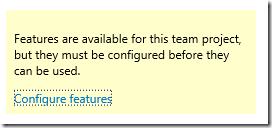
and still see the error odds are you have need to follow similar steps to below
#Look for the actual exception
Take a look at the event log under the Microsoft-Team Foundation Server/Debug section of Applications and Services Log
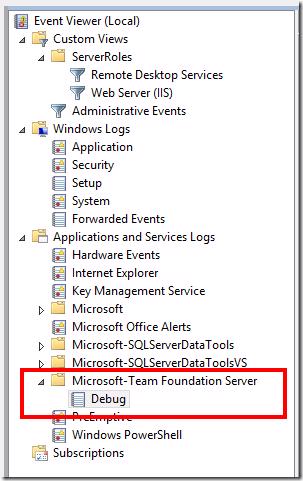
When the error occurs do you see an error? I received the error below that pointed towards something with the add panel being wrong
Microsoft.TeamFoundation.Server.WebAccess.WorkItemTracking.Common.InvalidProjectSettingsException: Object reference not set to an instance of an object. ---> System.NullReferenceException: Object reference not set to an instance of an object.
at Microsoft.TeamFoundation.Server.WebAccess.WorkItemTracking.Common.DefaultSettingsValidatorDataProvider.GetFieldType(String workItemTypeName, String fieldReferenceName)
at Microsoft.TeamFoundation.Server.WebAccess.WorkItemTracking.Common.ProcessSettingsValidator.<>c__DisplayClass4b.<>c__DisplayClass4f.<ValidateAddPanels>b__41(String type)
at System.Linq.Enumerable.Any[TSource](IEnumerable1 source, Func2 predicate)
at Microsoft.TeamFoundation.Server.WebAccess.WorkItemTracking.Common.ProcessSettingsValidator.<>c__DisplayClass4b.<ValidateAddPanels>b__40(String refName)
at System.Linq.Enumerable.WhereEnumerableIterator1.MoveNext() at System.Collections.Generic.List1..ctor(IEnumerable1 collection) at System.Linq.Enumerable.ToList[TSource](IEnumerable1 source)
at Microsoft.TeamFoundation.Server.WebAccess.WorkItemTracking.Common.ProcessSettingsValidator.ValidateAddPanels()
at Microsoft.TeamFoundation.Server.WebAccess.WorkItemTracking.Common.ProcessSettingsValidator.ValidateContent(OptionalFeatures featuresToValidate)
at Microsoft.TeamFoundation.Server.WebAccess.WorkItemTracking.Common.ProcessSettingsValidator.Validate(OptionalFeatures featuresToValidate, Boolean validateStructureOnly)
--- End of inner exception stack trace ---
at Microsoft.TeamFoundation.Server.WebAccess.WorkItemTracking.Common.ProcessSettingsValidator.Validate(OptionalFeatures featuresToValidate, Boolean validateStructureOnly)
at Microsoft.TeamFoundation.Server.WebAccess.WorkItemTracking.Common.ProcessSettingsValidator.Validate(TeamFoundationRequestContext requestContext, ProjectProcessConfiguration settings, String projectUri, Boolean correctWarnings, OptionalFeatures featuresToValidate)
at Microsoft.TeamFoundation.Server.WebAccess.WorkItemTracking.Common.ProjectConfigurationService.GetProcessSettings(TeamFoundationRequestContext requestContext, String projectUri, Boolean validate, Boolean bypassCache)
at Microsoft.TeamFoundation.Server.WebAccess.WorkItemTracking.Common.ProjectConfigurationService.GetCommonSettings(TeamFoundationRequestContext requestContext, String projectUri, Boolean validateSettings)
at Microsoft.TeamFoundation.Server.WebAccess.Agile.AgileAreaRegistration.CanDisplayTiles(TfsWebContext webContext)
#Find the problem
I went over to the process configuration which seemed to be the logical starting point based off the error on screen and stack trace from the event log. I compared all the customizations I had with what is in the default Scrum 2013.2 template and saw that I had extra fields in one of my Add Panels
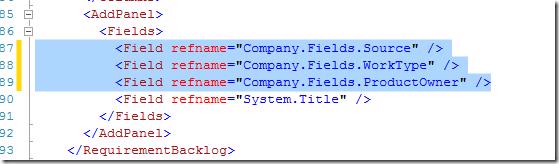
I removed these and imported the ProcessConfiguration.xml using the witAdmin importprocessconfig tool, this worked and the site was working as normal without the error.
#Fix the problem
Obviously we couldn't just remove the extra fields and be on our way because those were there for a reason. The Add Panel changes were applied for the Requirements Backlog in our case. We took a look at the Categories.xml to verify which the work item types were that were part of the requirements and found the 4 below

We currently only use new Product Backlog Items and the other 3 are "old" work item types that are in TFS because we used to use them and don't want to remove them because there are existing work items of this type in our TFS project. So we went to the 3 other WITd and made sure that they each had these 3 fields, we found as we expected that they didn't have each of them.
After adding the fields we re-imported the WITd for all requirement types and then tried to import the ProcessConfiguration.xml and it imported without any issues and our TFS was working again without any errors.
#What Happened then?
Before the update we were obviously using this template so everything use to work, although I must admit it makes more sense that all WITd's need the fields being displayed in the Add Panel for it's categories, it use to not be the case so after upgrading this was a rather unusual error for us. It could possible have been looked at as a bug here this wasn't required to match. If I find out the reason for the change I'll update here 🙂