Adding YakShaver recording and telemetry to a web app

On this page6 sections ▾
YakShaver turns a screen recording into a work item. I added a Record with YakShaver button to an app's assistant orb so people can report a bug from the page they're using, with the page and user details attached automatically.
The button uses YakShaver Anywhere's hidden mode. Each recording gets a correlation id that's attached to the work item and the app's browser and server telemetry, so I can use the id in a bug report to find its requests and logs.
#Starting a recording from your own button
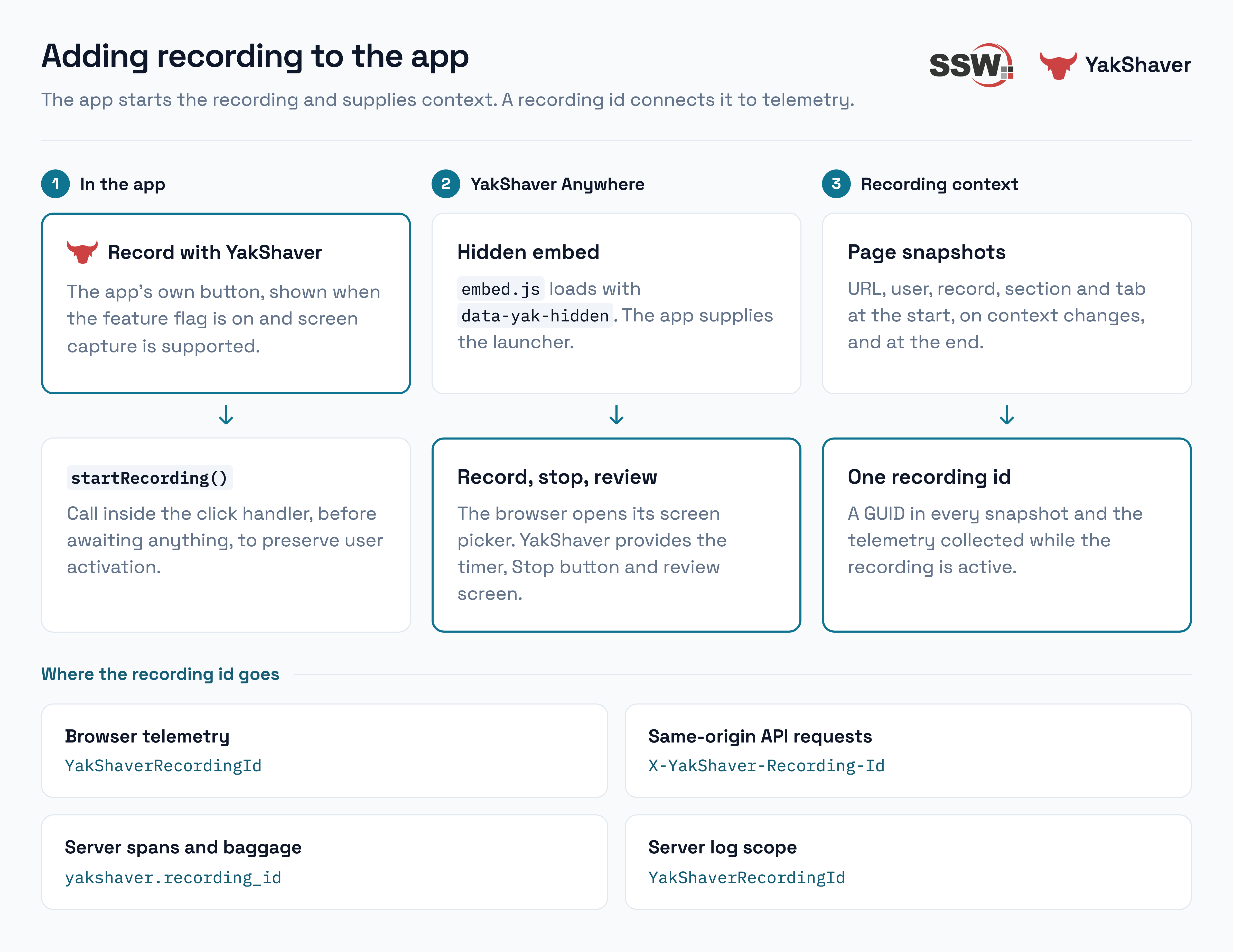
YakShaver Anywhere loads through a script tag. Adding data-yak-hidden hides its floating launcher, and the app uses window.YakShaverAnywhere to start a recording:
<script src="https://portal.yakshaver.ai/embed.js"
        data-yak-key="yak_pub_..."
        data-yak-hidden
        data-yak-position="bottom-left"
        async></script>
Each environment has a public embed key in its deployment config, so dev, UAT and prod send recordings to their own YakShaver projects. data-yak-position puts the recording panel at the bottom left, clear of the app's orb at the bottom right. A feature flag, off by default, controls both loading the embed and showing the button.
Call startRecording() directly inside the button's click handler, before awaiting anything. Screen capture requires user activation, which can expire if you wait for an asynchronous call before opening the screen picker.
button.addEventListener('click', () => {
  // No await before this line: the browser must still see the user's click.
  window.YakShaverAnywhere.startRecording().then(result => {
    // result.status is 'started', 'cancelled' or 'failed' (with a reason such as 'unsupported')
    showState(result);
  });
});
The promise resolves with started, cancelled or failed, so the button can update from Starting… to Recording or show an error. YakShaver's panel provides the timer and Stop button. Once the user stops recording, they can review it before submitting.
I hide the button on phones using pointer: coarse or a narrow viewport check, since the browser screen capture API isn't available there.
#Sending context with every recording
The app attaches context through two YakShaver APIs:
setContextCallbacks({ start, end })supplies a snapshot when recording starts and another when it stops. Each callback returns a flat object.attachContext(values, { label })adds a snapshot during the recording, such as when the user changes tabs or opens another record.
Each snapshot includes the page URL, user id, staff id and name, along with the current record, section and tab. I send every key each time and use null for anything that doesn't apply. Leaving a record clears its id in the next snapshot. Labels such as Opened record and Changed tab describe the changes in the work item's timeline.
function onContextChanged(next) {
  if (!recordingId || sameAs(lastSent, next)) return;

  const label =
    lastSent.recordId !== next.recordId
      ? (next.recordId ? 'Opened record' : 'Left record')
      : lastSent.sectionId !== next.sectionId ? 'Changed section'
      : lastSent.tab !== next.tab ? 'Changed tab'
      : 'Navigated';

  window.YakShaverAnywhere.attachContext({ ...next, recordingId }, { label });
  lastSent = next;
}
In this app, the section title becomes available a render after its id. I include it in the next snapshot instead of sending an extra event for the title alone. The tab list also needs to stay associated with the record that supplied it, or a snapshot during navigation can combine the new record id with the previous record's tabs.
#Finding telemetry with the recording id
I generate a GUID when recording starts and use it as a correlation id to find the related requests and logs:
- Every context snapshot includes it, so it's available on the work item.
- An Application Insights telemetry initializer adds
YakShaverRecordingIdto browser telemetry while the recording is active. - API calls to the same origin carry an
X-YakShaver-Recording-Idheader. I leave third-party requests alone because adding a custom header can trigger a CORS preflight that the other service doesn't support.
The existing middleware adds the user id to request telemetry. It now also reads the recording header and validates its GUID format, then adds it to the request span, W3C baggage and log scope. Baggage carries the id to downstream services:
var recordingId = Guid.TryParseExact(
    context.Request.Headers["X-YakShaver-Recording-Id"].ToString(), "D", out var id)
    ? id.ToString("D")
    : null;

if (recordingId is not null && Activity.Current is { } activity)
{
    activity.SetTag("yakshaver.recording_id", recordingId);
    activity.SetBaggage("yakshaver.recording_id", recordingId);
}

var scope = new Dictionary<string, object> { ["UserId"] = userId };
if (recordingId is not null)
{
    scope["YakShaverRecordingId"] = recordingId;
}

using (logger.BeginScope(scope))
{
    await next(context);
}
A baggage processor copies the recording id onto child spans, including dependency calls. It applies the same GUID validation because baggage can also arrive over HTTP.
#The PBI YakShaver created
The PBI YakShaver logged includes the video link and a screenshot above the description, steps to reproduce, expected behaviour, tasks and acceptance criteria.
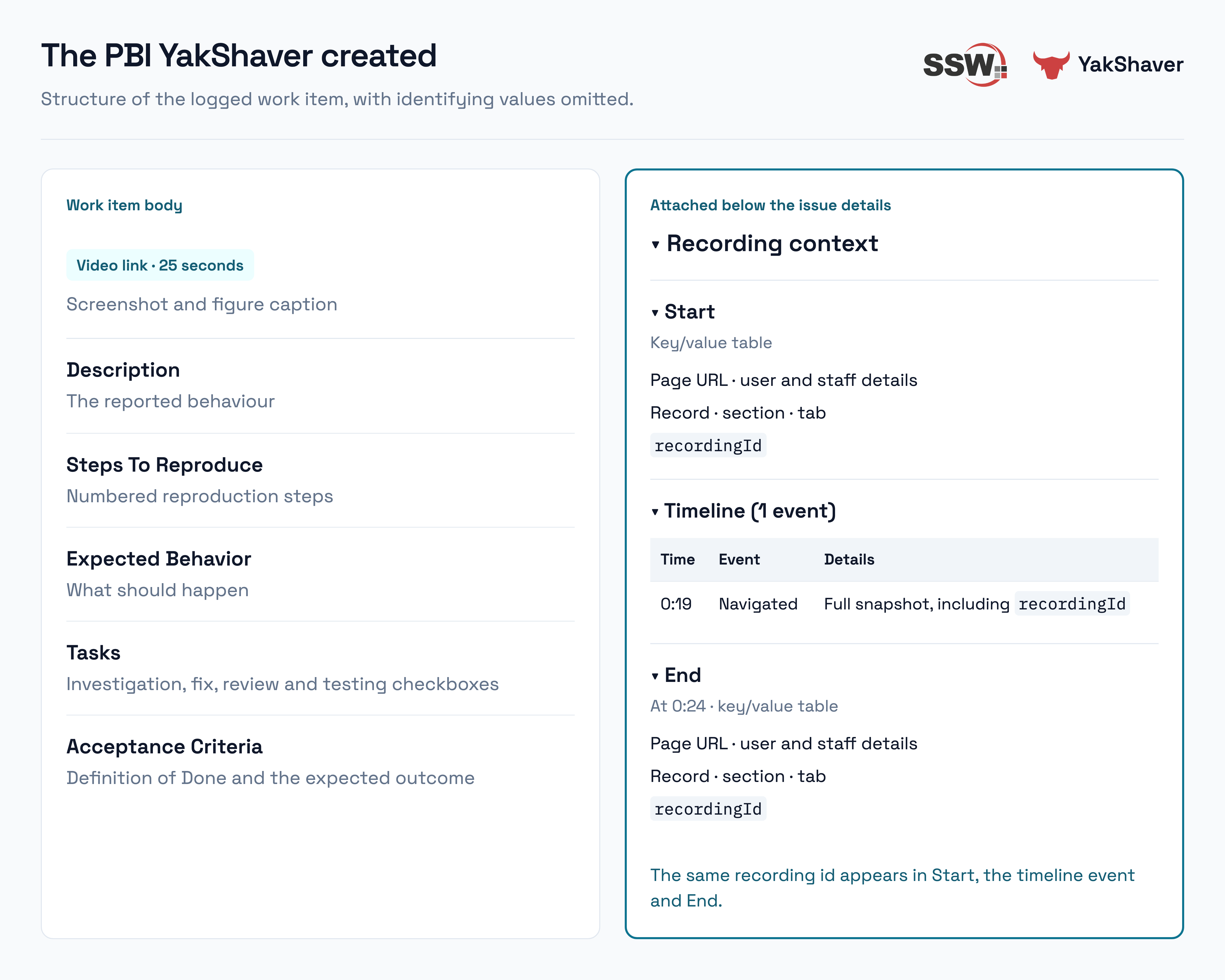
Below the issue details, Recording context contains collapsible Start, Timeline and End sections. Start and End are key/value tables. The timeline records each context change and its elapsed time; this recording has one Navigated event at 0:19 and an end snapshot at 0:24. Each includes the recording id to copy into an Application Insights query.
#What the logs look like
The recording lasted about 25 seconds and included a tab switch on a dashboard. This query searches the event, trace, request, dependency and page-view tables in Log Analytics for its recording id:
union withsource=Table AppEvents, AppTraces, AppRequests, AppDependencies, AppPageViews
| where TimeGenerated > ago(3d)
| where tostring(Properties) has "<recording id>"
| project TimeGenerated, Table, AppRoleName, Name, ResultCode, DurationMs, OperationId
| order by TimeGenerated asc
The query returned 23 rows, including the browser's recording start and end events and its page views. For a request triggered by the tab switch, I could follow the browser call through the web host and API to its SQL dependencies under the same operation id. The recording id groups the session's telemetry, while the operation id connects the spans for an individual request.
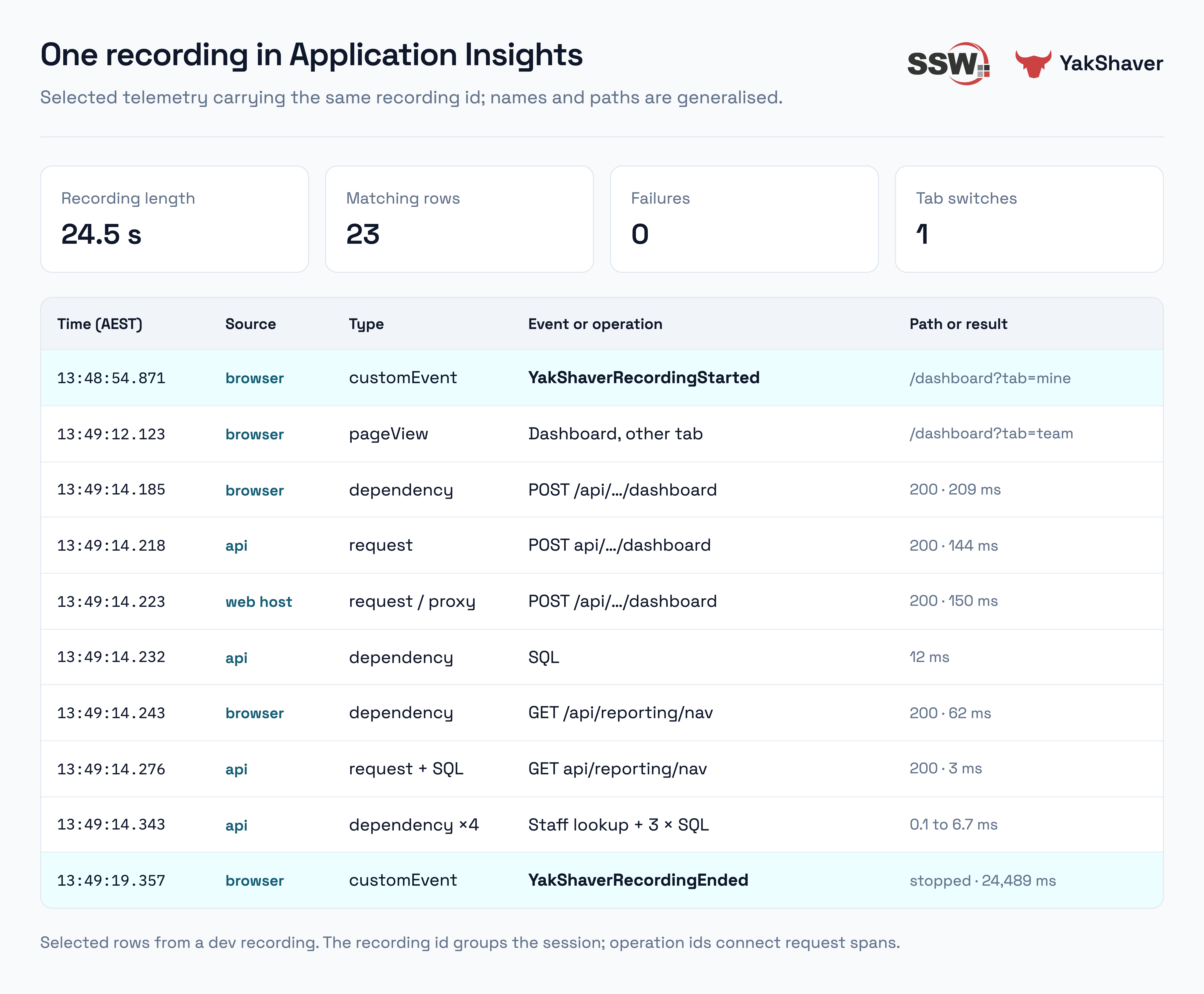
No AppTraces rows matched the recording id because nothing logged at Information or above during the two requests.
#Page reloads and browser policies
The recording runs in the page, so a full reload ends it and loses the captured video. YakShaver shows a "Leave site?" warning before navigation. I've reported this to the YakShaver team; for now, navigation within the app works as long as it doesn't reload the page.
The Content Security Policy (CSP) needs YakShaver's origin in script-src for embed.js and in frame-src for the recording panel. Without the script permission, the browser reports Refused to load https://portal.yakshaver.ai/embed.js because it does not appear in the script-src directive.
Permissions-Policy also needs to allow screen capture and microphone access for YakShaver. The app was sending microphone=(), which would have blocked voice recording. On hosts that load the embed, I changed the policy to include display-capture=("https://portal.yakshaver.ai") and microphone=("https://portal.yakshaver.ai"). That allows YakShaver's frame to request those permissions while leaving them disabled for the host page.