← all posts Gordon Beeming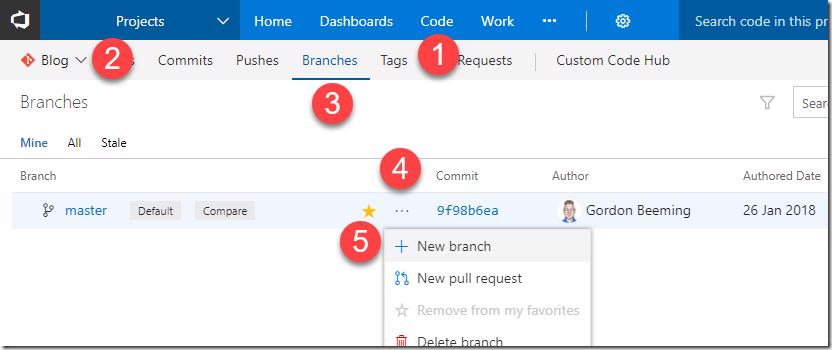
Steps to create a new branch in VSTS 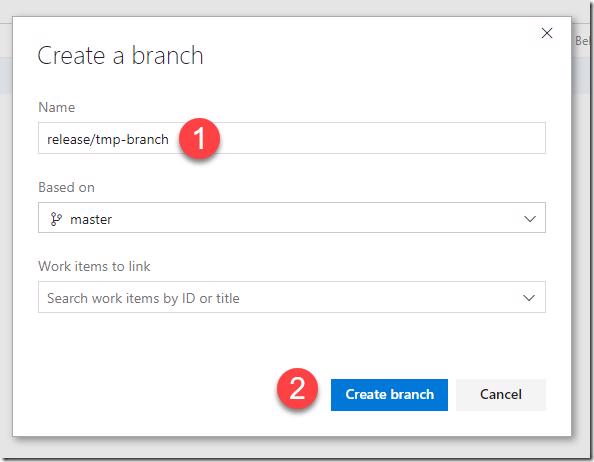
Entering branch name and creating the new branch in VSTS 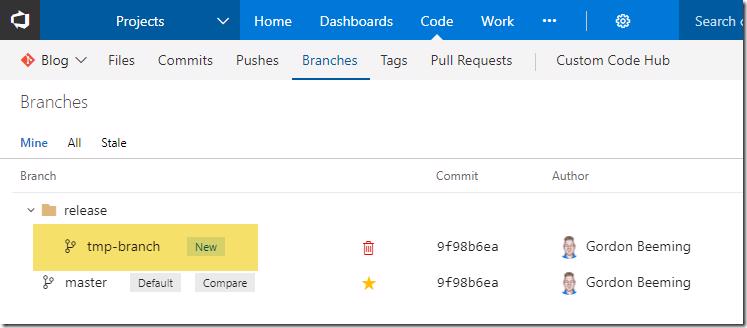
The newly created branch listed in VSTS
Creating a new branch in @VSTS
On this page1 section ▾
This is a quick reference post that shows you how to create a branch in VSTS and TFS.
#Steps
The steps for this are quite simple. You will need to
- Navigate to the Code Hub Group, then
- Select the Repo you want to set the policy for, then
- Navigate to the Branches hub, next
- Click on the ellipse and lastly
- Click on New branch
Next type in
- A name for the branch in the folder you would like to set the branch name then
- Click Create branch
That's all and your branch is created
Happy coding 😁
Related posts