Building libraries that target multiple frameworks

On this page7 sections ▾
#Introduction
I've generally built libraries wrong by placing all binaries in the root and it's worked ok for now so why change it. I might also add that these libraries have been for internal use so no real reason for not doing this I guess.
#What Changed?
So although as mentioned I generally just put all the binaries in the root of the package, for Full Framework this worked 100% but for .net core apps I received a message saying that the library referenced was added as a 4.6.2 reference because it was not able to determine the correct framework version. Now although the code in the libs worked this made me feel bad inside 😜. Before I show how this get's fixed let's take a look at what an example of the nuspec would have looked like
<?xml version="1.0"?>
<package xmlns="http://schemas.microsoft.com/packaging/2010/07/nuspec.xsd">
  <metadata>
    <id>TargetMultipleFrameworksForLib</id>
    <version>2018.07.30.123</version>
    <authors>Gordon Beeming</authors>
    <requireLicenseAcceptance>false</requireLicenseAcceptance>
    <summary></summary>
    <description>Some description</description>
    <copyright>2018</copyright>
    <tags>Samples</tags>
  </metadata>
  <files>
    <file src="bin\Debug\netcoreapp2.1\TargetMultipleFrameworksForLib.*" target="lib" />
  </files>
</package>
When packing this you do get a warning that you doing bad things but if it works it works right 😁 (I am joking 😜).

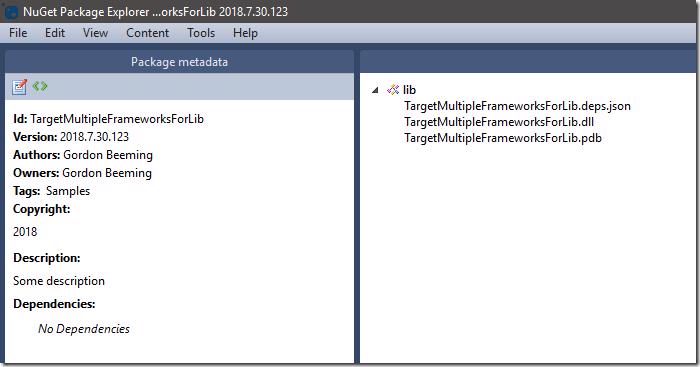
and inside our package we see the contents in the lib folder
#Fixing our nuspec file
To fix this nuspec file all we need to do is place the binaries in the correct framework folder as well
<?xml version="1.0"?>
<package xmlns="http://schemas.microsoft.com/packaging/2010/07/nuspec.xsd">
  <metadata>
    <id>TargetMultipleFrameworksForLib</id>
    <version>2018.07.30.123</version>
    <authors>Gordon Beeming</authors>
    <requireLicenseAcceptance>false</requireLicenseAcceptance>
    <summary></summary>
    <description>Some description</description>
    <copyright>2018</copyright>
    <tags>Samples</tags>
  </metadata>
  <files>
    <file src="bin\Debug\netcoreapp2.1\TargetMultipleFrameworksForLib.*" target="lib\netcoreapp2.1" />
  </files>
</package>
With this the warning goes away

and the package now has your binaries in the correct lib folder like you should be building your libraries
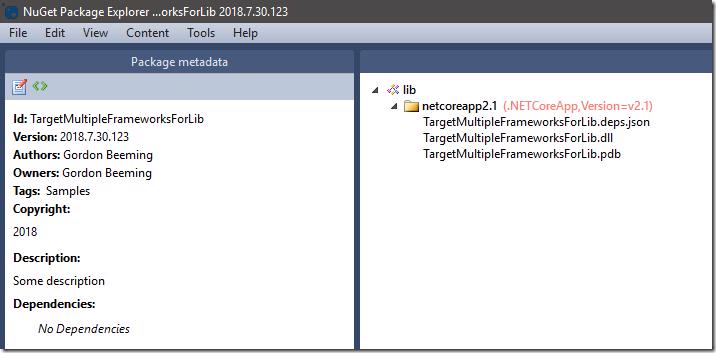
Now you get no more warnings or strange behavior like saying my .net core class library needed to be added as a 4.6.2 reference. This leads to another problem which is that we have issues using this lib targeting other frameworks like aspnet core 2.0 for example so how do we solve this?
#Using TargetFrameworks to target multiple frameworks
It seems quite obvious now that it's done but to enable you targeting multiple frameworks for your lib you just need to change your framework reference from using TargetFramework
<PropertyGroup>
  <TargetFramework>netcoreapp2.1</TargetFramework>
</PropertyGroup>
to using TargetFrameworks
<PropertyGroup>
  <TargetFrameworks>netcoreapp2.1</TargetFrameworks>
</PropertyGroup>
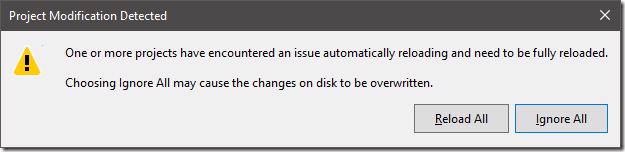
When saved unlike most other parameters that don't affect VS anymore you will be asked to reload the solution, just click Reload All
You are now free to add more frameworks separated by semi colon like below
<PropertyGroup>
  <TargetFrameworks>netcoreapp2.0;netcoreapp2.1</TargetFrameworks>
</PropertyGroup>
and Visual Studio will react by showing you multiple frameworks under Dependencies
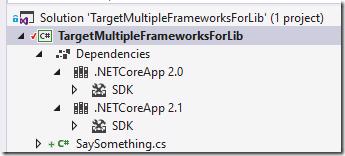
When you compile Visual Studio will now compile against both frameworks and you will therefore have 2 folders in your configuration specific build folder
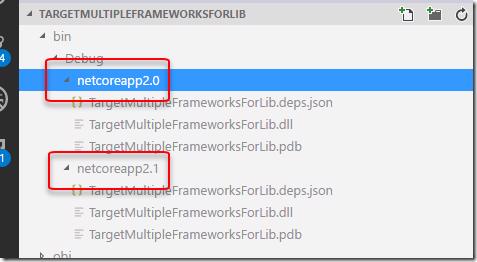
From here you can alter your nuspec file to just reference both (all) sets of binaries like so
<?xml version="1.0"?>
<package xmlns="http://schemas.microsoft.com/packaging/2010/07/nuspec.xsd">
  <metadata>
    <id>TargetMultipleFrameworksForLib</id>
    <version>2018.07.30.123</version>
    <authors>Gordon Beeming</authors>
    <requireLicenseAcceptance>false</requireLicenseAcceptance>
    <summary></summary>
    <description>Some description</description>
    <copyright>2018</copyright>
    <tags>Samples</tags>
  </metadata>
  <files>
    <file src="bin\Debug\netcoreapp2.0\TargetMultipleFrameworksForLib.*" target="lib\netcoreapp2.0" />
    <file src="bin\Debug\netcoreapp2.1\TargetMultipleFrameworksForLib.*" target="lib\netcoreapp2.1" />
  </files>
</package>
When packed you get the same warning(less) output and the nuget package now contains a binary specific to aspnet core 2.0 and 2.1.
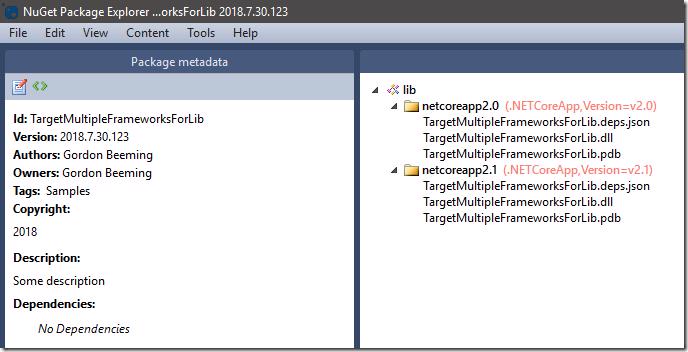
This can obvious be whatever you want to target, in my example I just happen to be targeting aspnet core. If you get some strange compile warnings/errors just delete the bin and obj folders and this will allow for a nice clean local build.
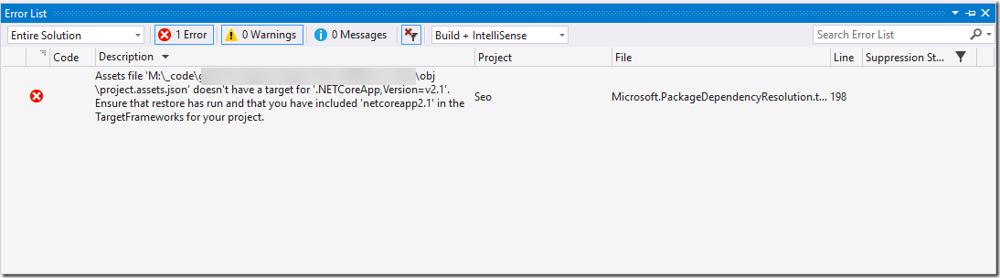
Removing the bin and obj and then running a resore (for the next error, below 😜) folder fixes the above
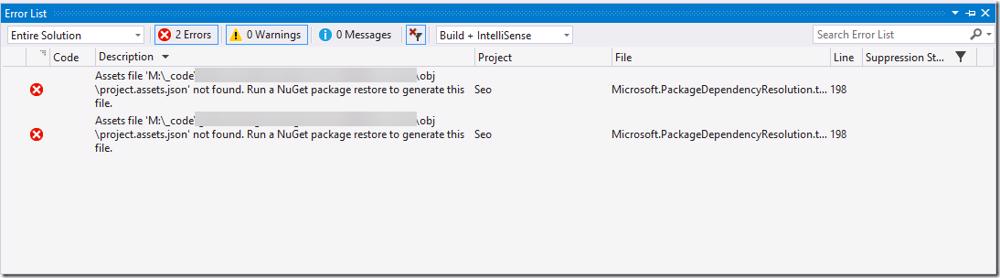
Should be all set now.
#Nuspec Tip
Some things that could be super obvious for others I thought I might just add here because before I knew about them I felt like my life was harder 😁. Basically the things is actually thing and that is parameters. In the above example you can see I have hard coded a bunch of values that you could want to dynamically drop in during your CI process. For example when you are compiling your binaries you won't generally want to pull from the Debug folder, what if you are building and packaging both Debug and Release (or more) configurations? This is what the above could typically look like and how you would pack it in an automated build
<?xml version="1.0"?>
<package xmlns="http://schemas.microsoft.com/packaging/2010/07/nuspec.xsd">
  <metadata>
    <id>TargetMultipleFrameworksForLib</id>
    <version>$version$</version>
    <authors>Gordon Beeming</authors>
    <requireLicenseAcceptance>false</requireLicenseAcceptance>
    <summary></summary>
    <description>$desc$</description>
    <copyright>$copyright$</copyright>
    <tags>Samples</tags>
  </metadata>
  <files>
    <file src="bin\$Configuration$\netcoreapp2.0\TargetMultipleFrameworksForLib.*" target="lib\netcoreapp2.0" />
    <file src="bin\$Configuration$\netcoreapp2.1\TargetMultipleFrameworksForLib.*" target="lib\netcoreapp2.1" />
  </files>
</package>
and the cmd for this would additionally use the -Properties arg
nuget pack TargetMultipleFrameworksForLib.nuspec -NonInteractive -Verbosity detailed -Properties Configuration=Debug;version=2018.07.30.456;copyright="Copyright © 2018";desc="some desc"and when you open the nupkg file you'd notice that the version number we used in this cmd had the version .456 at the end.
#Adding Traceability to your nupkg with VSTS
I love VSTS and TFS because there is so much traceability that's baked in. I use versioning tasks to stamp build information into my binaries and thought why not do the same with packages. For this I have a Task Group which I use to do my nuget pack and it looks like below
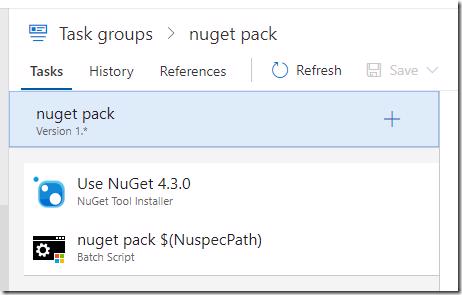
So I just make sure the version of NuGet I am currently using is installed, I then run pack with the command like the previous section but I put the below in the Arguments field
pack $(NuspecPath) -NonInteractive
                    -Verbosity detailed
                    -OutputDirectory "$(NuPkgOutputDirectory)"
                    -Properties Configuration=$(BuildConfiguration);
                                $(NuspecProperties);
                                version=$(NuGetVersion);
                                copyright="Copyright © 2018";
                                desc="Version ($(build.buildNumber) | $(NuGetVersion)) Reason: $(Build.Reason) |
                                      Branch: $(Build.SourceBranch) | Configuration: $(BuildConfiguration) |
                                      BuildPlatform: $(BuildPlatform) | Build Number: $(Build.BuildNumber) |
                                      Commit Id: $(Build.SourceVersion)"
I've split the lines for ease of reading in the post but you should. There is a couple parameters in here that I have generally either as variables or set by other parts the build process but these are them if you replicating this
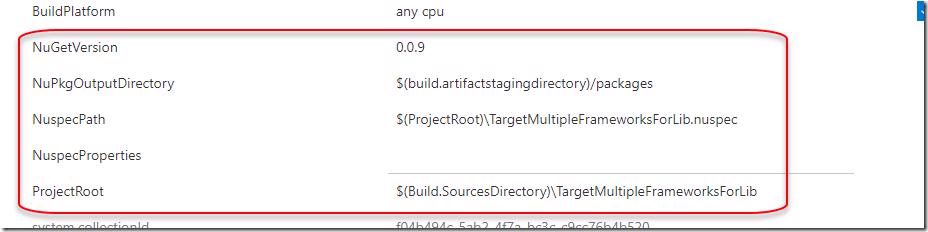
If you want to grab the task group for this you can save the below json to disk and import it to VSTS.
{
    "tasks": [
        {
            "displayName": "Use NuGet 4.3.0",
            "alwaysRun": false,
            "continueOnError": false,
            "condition": "succeeded()",
            "enabled": true,
            "timeoutInMinutes": 0,
            "inputs": {
                "versionSpec": "4.3.0",
                "checkLatest": "false"
            },
            "task": {
                "id": "2c65196a-54fd-4a02-9be8-d9d1837b7c5d",
                "versionSpec": "0.*",
                "definitionType": "task"
            }
        },
        {
            "displayName": "nuget pack $(NuspecPath)",
            "alwaysRun": false,
            "continueOnError": false,
            "condition": "succeeded()",
            "enabled": true,
            "timeoutInMinutes": 0,
            "inputs": {
                "filename": "$(NuGetExeToolPath)",
                "arguments": "pack $(NuspecPath) -NonInteractive -Verbosity detailed -OutputDirectory \"$(NuPkgOutputDirectory)\" -Properties Configuration=$(BuildConfiguration);$(NuspecProperties);version=$(NuGetVersion);copyright=\"Copyright © 2018\";desc=\"Version ($(build.buildNumber) | $(NuGetVersion)) Reason: $(Build.Reason) | Branch: $(Build.SourceBranch) | Configuration: $(BuildConfiguration) | BuildPlatform: $(BuildPlatform) | Build Number: $(Build.BuildNumber) | Commit Id: $(Build.SourceVersion)\"",
                "modifyEnvironment": "False",
                "workingFolder": "",
                "failOnStandardError": "true"
            },
            "task": {
                "id": "bfc8bf76-e7ac-4a8c-9a55-a944a9f632fd",
                "versionSpec": "1.*",
                "definitionType": "task"
            }
        }
    ],
    "runsOn": [
        "Agent",
        "DeploymentGroup"
    ],
    "revision": 3,
    "createdBy": {
        "displayName": "Gordon Beeming",
        "id": "13fa58f2-ffb8-6b13-b147-dfddf5e43a48",
        "uniqueName": "gordonbeeming@outlook.com"
    },
    "createdOn": "2018-07-30T21:37:49.223Z",
    "modifiedBy": {
        "displayName": "Gordon Beeming",
        "id": "13fa58f2-ffb8-6b13-b147-dfddf5e43a48",
        "uniqueName": "gordonbeeming@outlook.com"
    },
    "modifiedOn": "2018-07-30T22:15:51.510Z",
    "comment": "",
    "id": "e521d491-a2b3-4a77-9c61-7a335ad7f861",
    "name": "nuget pack",
    "version": {
        "major": 1,
        "minor": 0,
        "patch": 0,
        "isTest": false
    },
    "iconUrl": "https://cdn.vsassets.io/v/20180727T215513/_content/icon-meta-task.png",
    "friendlyName": "nuget pack",
    "description": "",
    "category": "Package",
    "definitionType": "metaTask",
    "author": "Gordon Beeming",
    "demands": [],
    "groups": [],
    "inputs": [
        {
            "aliases": [],
            "options": {},
            "properties": {},
            "name": "BuildConfiguration",
            "label": "BuildConfiguration",
            "defaultValue": "$(BuildConfiguration)",
            "required": true,
            "type": "string",
            "helpMarkDown": "",
            "groupName": ""
        },
        {
            "aliases": [],
            "options": {},
            "properties": {},
            "name": "BuildPlatform",
            "label": "BuildPlatform",
            "defaultValue": "$(BuildPlatform)",
            "required": true,
            "type": "string",
            "helpMarkDown": "",
            "groupName": ""
        },
        {
            "aliases": [],
            "options": {},
            "properties": {},
            "name": "NuGetExeToolPath",
            "label": "NuGetExeToolPath",
            "defaultValue": "$(NuGetExeToolPath)",
            "required": true,
            "type": "filePath",
            "helpMarkDown": "don't worry about this, it's set privately in the task group",
            "groupName": ""
        },
        {
            "aliases": [],
            "options": {},
            "properties": {},
            "name": "NuGetVersion",
            "label": "NuGetVersion",
            "defaultValue": "$(NuGetVersion)",
            "required": true,
            "type": "string",
            "helpMarkDown": "",
            "groupName": ""
        },
        {
            "aliases": [],
            "options": {},
            "properties": {},
            "name": "NuPkgOutputDirectory",
            "label": "NuPkgOutputDirectory",
            "defaultValue": "$(build.artifactstagingdirectory)/packages",
            "required": true,
            "type": "string",
            "helpMarkDown": "",
            "groupName": ""
        },
        {
            "aliases": [],
            "options": {},
            "properties": {},
            "name": "NuspecPath",
            "label": "NuspecPath",
            "defaultValue": "$(NuspecPath)",
            "required": true,
            "type": "string",
            "helpMarkDown": "",
            "groupName": ""
        },
        {
            "aliases": [],
            "options": {},
            "properties": {},
            "name": "NuspecProperties",
            "label": "NuspecProperties",
            "defaultValue": "$(NuspecProperties)",
            "required": true,
            "type": "string",
            "helpMarkDown": "",
            "groupName": ""
        }
    ],
    "satisfies": [],
    "sourceDefinitions": [],
    "dataSourceBindings": [],
    "instanceNameFormat": "Task group: nuget pack $(BuildConfiguration)",
    "preJobExecution": {},
    "execution": {},
    "postJobExecution": {}
}
The nupkg that is generated looks like below when opened
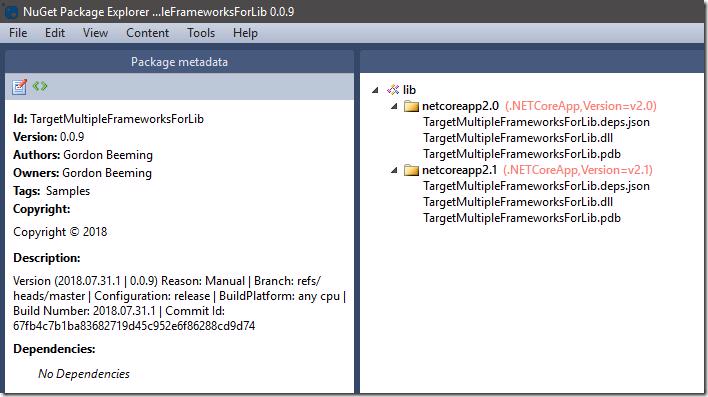
You can see the description on the left has all the info detailed how this package was made and from where. As mentioned a little while earlier I build up some parameters during build so for example NuGetVersion reads and is adjusted from a file on disk generally but you could just pass in the build number if you wanted to. Lastly if you using yaml in VSTS you can use the snippet below (with some fixing) to add the 2 steps if the above isn't working out for some reason
queue:
  name: Hosted VS2017
  condition: succeeded()
  demands: Cmd


#Your build pipeline references an undefined variable named 'NuGetExeToolPath'. Create or edit the build pipeline for this YAML file, define the variable on the Variables tab. See https://go.microsoft.com/fwlink/?linkid=865972
#Your build pipeline references the 'BuildConfiguration' variable, which you've selected to be settable at queue time. Create or edit the build pipeline for this YAML file, define the variable on the Variables tab, and then select the option to make it settable at queue time. See https://go.microsoft.com/fwlink/?linkid=865971
#Your build pipeline references the 'BuildConfiguration' variable, which you've selected to be settable at queue time. Create or edit the build pipeline for this YAML file, define the variable on the Variables tab, and then select the option to make it settable at queue time. See https://go.microsoft.com/fwlink/?linkid=865971
#Your build pipeline references the 'BuildPlatform' variable, which you've selected to be settable at queue time. Create or edit the build pipeline for this YAML file, define the variable on the Variables tab, and then select the option to make it settable at queue time. See https://go.microsoft.com/fwlink/?linkid=865971
variables:
  NuspecPath: '$(ProjectRoot)\TargetMultipleFrameworksForLib.nuspec'
  NuPkgOutputDirectory: '$(build.artifactstagingdirectory)/packages'
  NuspecProperties: ''
  NuGetVersion: '0.0.9'
steps:
- task: NuGetToolInstaller@0
  displayName: Use NuGet 4.3.0

- task: BatchScript@1
  displayName: nuget pack $(NuspecPath)
  inputs:
    filename: '$(NuGetExeToolPath)'
    arguments: 'pack $(NuspecPath) -NonInteractive -Verbosity detailed -OutputDirectory "$(NuPkgOutputDirectory)" -Properties Configuration=$(BuildConfiguration);$(NuspecProperties);version=$(NuGetVersion);copyright="Copyright © 2018";desc="Version ($(build.buildNumber) | $(NuGetVersion)) Reason: $(Build.Reason) | Branch: $(Build.SourceBranch) | Configuration: $(BuildConfiguration) | BuildPlatform: $(BuildPlatform) | Build Number: $(Build.BuildNumber) | Commit Id: $(Build.SourceVersion)"'
failOnStandardError: true#Now what?
Well with a little bit of squirreling at the end we managed to build a library that targets multiple frameworks. The code although not impressive is hosted on VSTS using the public projects feature.
There is still a world of hurt that I know is coming like when dependencies don't match between frameworks and I look forward to solving (mad Google skills) those problems and posting my findings under the tags NuGet or nuspec.