SSMS 2016 where have my line breaks gone?

On this page1 section ▾
I'm hoping it's not just me but one of the things I was missing from SSMS 2014 is that I had my line breaks when copying large text fields out of the query results. For a long time I have been putting it off and only using SSMS 2014, last week I re-installed my Operating System and decided not to install SSMS 2014 just for this 1 feature.
Today I queried that 1 large value again where I needed line breaks and got a very long string (or varchar for you db people 🙂). I decided to go looking if they have made this into a setting before reverting back to SSMS 2014 like I have in the past and found there is actually a setting for this as you would expect 😁.
#Retain CR/LF on copy or save
As mentioned there is a setting for this and it's not as hard to find as most other settings 🙂
#Option 1 – Navigate the menu's
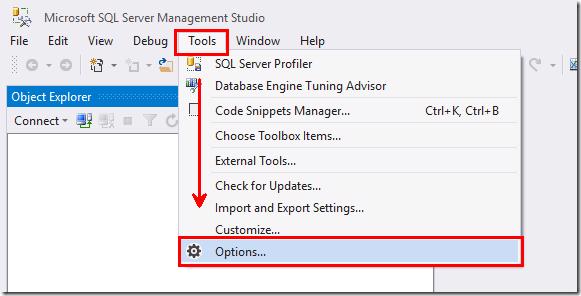
Open Tools, Options
Navigate to Query Results, SQL Server, Results to Grid
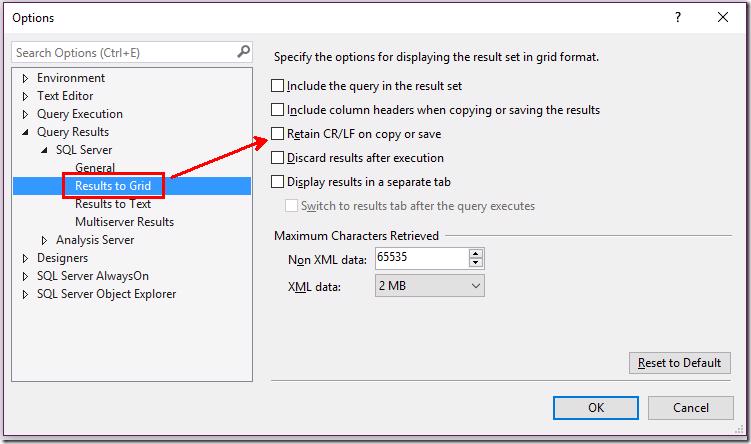
and on the right you will find a checkbox for Retain CR/LF on copy or save, switch that to checked and any future query windows will have you copying your text properly 🙂.
#Option 2 – Search
Open Tools, Options
Type Grid in the search box
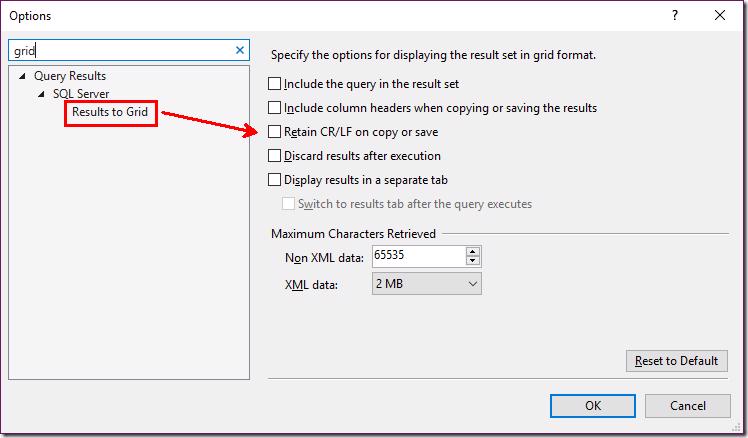
and on the right you will find a checkbox for Retain CR/LF on copy or save, switch that to checked and any future query windows will have you copying your text properly 🙂.
Hope this is useful for someone else as well. I find I usually fall back to what works instead of looking for the 'right' solution and if you look me that might be why you landed on this blog today 🙂.