Opening apps from the directory you in as Administrator

On this page2 sections ▾
The other day I saw a post that Greg Duncan shared about opening CMD and PowerShell from the directory you in.
How did I not know this? Open CMD/PS to the directory you're in, from File Explorer (no right-click needed) https://t.co/ynPFCGw9xm pic.twitter.com/hL2iFGVHsE — Greg Duncan (@gduncan411) December 7, 2016
Now although there is no rocket science behind this I never thought to ever try it, now that I have tried it I can't use it ☹️
#The Problem is…
You see the problem is ever time I need a CMD or PowerShell window it generally needs to be running in admin mode (any one who knows how let me know 😁).
#The Resolution is…
Now being a week since seeing the post I really feel that I should be using this gem so decided to write code to make it possible for me. I won't go into too much detail because the code is on GitHub (https://go.beeming.net/2hocTo8). Basically all you do is
-
Copy the admin.exe from the compiled folder on GitHub (or pull down the code and compile yourself) into your windows folder, which is location in C:\Windows by default.
-
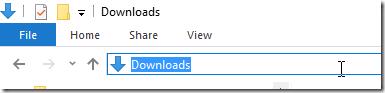
Click in the address bar in windows explorer
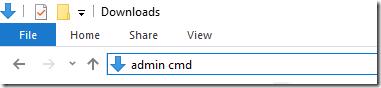
- Type any command
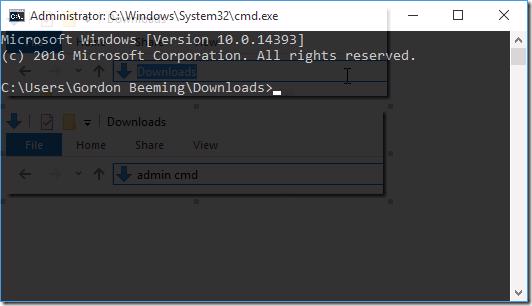
- Press enter and see it launch that app as Administrator with the working directory set correctly
Hope this little utility will fill this little gap I had for others as well 😁