← all posts Gordon Beeming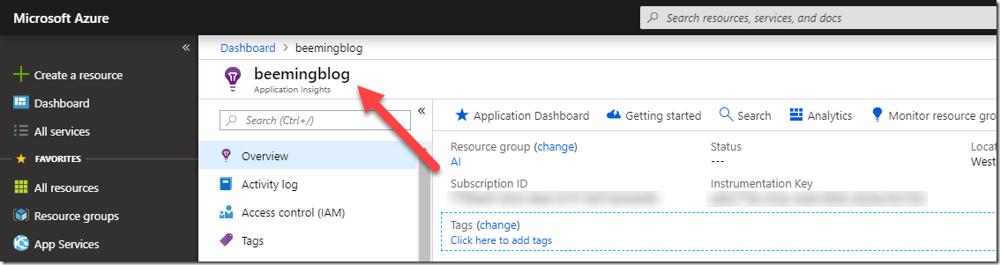
Application Insights resource in Azure Portal 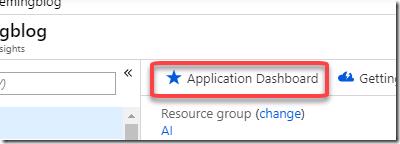
Application Dashboard button in Application Insights 
Azure Dashboard for Application Insights 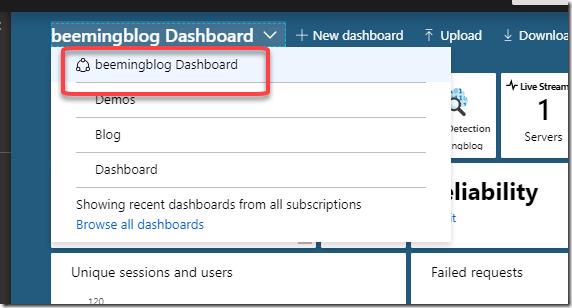
Shared Azure Dashboard for Application Insights
Creating an Azure dashboard for Application Insights in 1,2,3
On this page1 section ▾
So watching this weeks asp.net community standup ASP.NET Community Standup - December 11, 2018 - 2.2 Release Party! and Scott Hanselman shows how to make a dashboard for your application insights resource in no time.
#How do I make a dashboard for Application Insights?
Basically head over to the* **(1)*Azure Portal and (2) find your resource, I've opened up my blog
Once open click the **(3) Application Dashboard button
What this will do for us is take all the important information from our resource and make a dashboard for us like below
The dashboard is also shared with other admins of the subscription
That was much quicker to make than the previous Blog dashboard that I made and has a lot more meaningful data on it 🙂
Related posts